Published June 04, 2026 in Meshub.ai
One Prompt, Multiple Models: A Better AI Workflow

Share



Most people ask one AI model a question, read the answer, and move on. That is fast, but it can hide important differences. Another model may structure the response better, challenge an assumption, catch a missing step, or explain the same idea in a way that is easier to use.
A one prompt, multiple models workflow gives you a simple upgrade: run the same prompt across several AI models, compare the outputs, then synthesize the strongest answer. The goal is not to make every task slower. The goal is to use comparison when quality, accuracy, or judgment matters.
Why One Prompt Across Multiple Models Works
Different AI models can respond differently because they may have different training data, product tuning, reasoning patterns, and interface constraints. That does not mean one answer is always right and another is always wrong. It means comparison can reveal useful tradeoffs.
- One model may produce a clearer outline.
- Another may ask better clarifying questions.
- Another may be more concise for operational tasks.
- Another may highlight risks or missing assumptions.
When you compare those responses side by side, you can make a better decision than you would from a single answer. This is especially useful for research, writing, product planning, coding review, prompt testing, and AI answer verification.
A Simple Multi-Model Workflow
Use this workflow when the answer matters enough to review, but not so much that you need a full formal evaluation process.
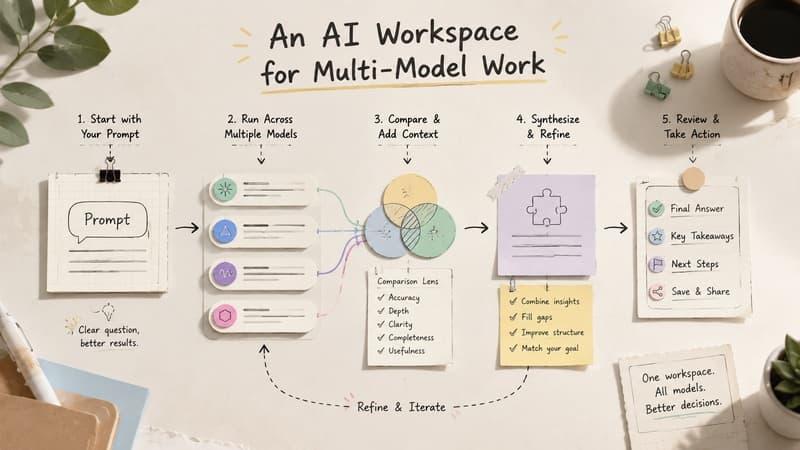
1. Write One Clear Prompt
Define the task, audience, constraints, and desired output format. Avoid changing the prompt between models during the first pass because that makes the comparison less useful.
2. Send It to Multiple Models
Run the same prompt through two or three AI models. More is not always better. Start with enough variety to reveal differences without creating too much review work.
3. Compare the Responses
Look for completeness, accuracy signals, structure, assumptions, and usability. Do not only choose the answer that sounds most confident.
4. Synthesize the Best Result
Combine the strongest parts, remove unsupported claims, and ask a follow-up prompt if the outputs disagree on something important.
When to Use This Workflow
You do not need multiple models for every small task. A quick rewrite, simple formatting request, or low-risk brainstorm may be fine with one assistant. Multi-model comparison is more useful when the output will shape a decision or save meaningful time later.
- Research: Compare summaries, missing angles, and source-checking suggestions.
- Writing: Compare outlines, tone options, and argument structure.
- Coding: Compare debugging ideas, edge cases, and implementation tradeoffs.
- Planning: Compare risk lists, decision criteria, and next-step recommendations.
- Prompt testing: Compare how stable a prompt is across different model styles.
How to Review Multiple AI Responses
Use a small scorecard instead of relying on instinct. For many everyday tasks, five criteria are enough: relevance, completeness, clarity, factual caution, and actionability. The best response is usually the one that fits the task, not the one that uses the most polished language.
If two models disagree, treat the disagreement as a signal. Ask what assumption changed, what evidence is missing, and whether the answer needs independent verification.
If you want a more detailed evaluation method, start with Meshub.ai's guide on how to compare AI models side by side and the broader explanation of multi-model AI chat.
How Meshub.ai Helps
Meshub.ai helps users discover AI tools, compare multi-model platforms, and think about AI work as a workflow instead of a single chatbot habit. That matters when you want to send one prompt to multiple models, compare the answers, and choose the strongest path for the task.
Meshub.ai is also useful when your workflow changes. A research workflow may need one type of AI tool, while a writing or coding workflow may need another. Discovery and comparison in one place make those decisions easier to revisit.
FAQ
What does one prompt, multiple models mean?
It means sending the same prompt to more than one AI model so you can compare the responses and use the strongest parts of each answer.
How many AI models should I compare?
For most everyday workflows, two or three models are enough. That gives you useful contrast without making the review process too heavy.
Is a multi-model workflow slower?
It can take more time upfront, but it may save time when the output is important. Comparing responses can reduce rewrites, catch weak assumptions, and improve the final result.
Should I always trust the answer that multiple models agree on?
No. Agreement can be useful, but it is not proof. Important claims still need verification, especially for legal, medical, financial, technical, or time-sensitive topics.
Meshub.ai helps users discover, compare, and explore the best AI tools and multi-model platforms in one place.