Published July 06, 2026 in Meshub.ai
What Is an AI Workspace? A Practical Guide for Multi-Model Work

Share


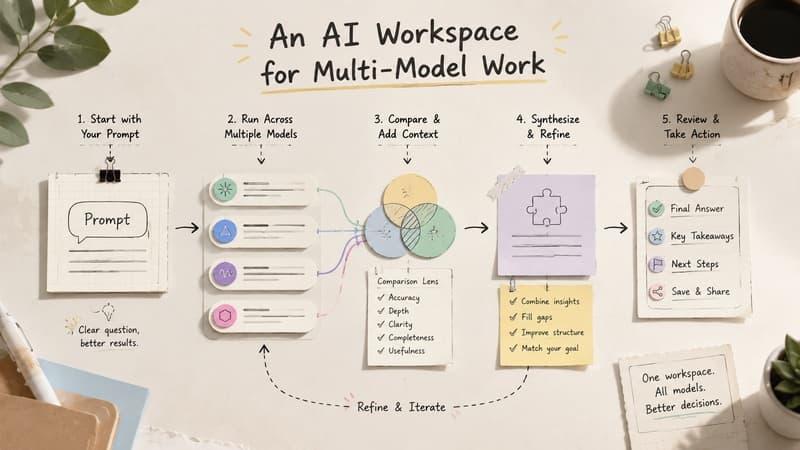
What is an AI workspace? An AI workspace is a focused environment where people use AI models, prompts, files, notes, and answer-review routines together instead of treating AI as a pile of disconnected chats. The goal is not simply to access a chatbot. The goal is to make AI work easier to organize, compare, reuse, and trust.
This distinction matters because many people now use several AI tools in parallel. They ask one model for research help, another for writing, another for code, and another for brainstorming. Without a workspace, useful context gets scattered across browser tabs, copied documents, and forgotten conversations. An AI workspace gives that work a structure.
For teams and serious solo users, the workspace becomes the place where AI turns from a novelty into an operating habit. It supports repeatable workflows, clearer decisions, and better review of AI-generated answers.
What is an AI workspace in practical terms?
An AI workspace combines access, context, and process. Access means the user can work with one or more AI models. Context means prompts, instructions, tasks, and relevant information stay attached to the work. Process means the user can compare, refine, verify, and reuse outputs instead of starting from scratch every time.
A simple chatbot window can answer a question. An AI workspace helps manage the larger job around the answer: what the user asked, why they asked it, which model responded best, what changed during revision, and what the final decision was.
That is why an AI workspace is often more valuable than another standalone AI app. It gives AI work a home.
Why an AI workspace matters
It reduces context switching
AI work often breaks down because the user is forced to move between too many tools. Research lives in one tab, draft notes in another, model answers in another, and the final output somewhere else. A workspace reduces that friction by keeping related work close together.
It makes model comparison easier
Different models can produce different answers to the same prompt. In a workspace, users can compare those answers without manually copying and pasting between tools. If you are new to this habit, Meshub.ai's guide on AI answer reliability explains why comparing and verifying responses matters before relying on them.
It helps teams reuse what works
Good prompts, review checklists, and decision patterns should not disappear after one conversation. A workspace makes it easier to reuse successful workflows and improve them over time. That is especially useful for marketing, research, product, support, and operations teams.
It creates a better audit trail for AI-assisted work
When AI contributes to important decisions, users need to understand how an output was produced. A workspace can preserve the prompt, model choice, comparison notes, and final edits. That makes the result easier to review and improve.
Key parts of a useful AI workspace
- Prompt area: a clear place to write, revise, and reuse prompts.
- Model access: the ability to use one or more AI models depending on the task.
- Side-by-side answers: a layout for comparing outputs without losing the original question.
- Workflow memory: saved instructions, notes, or task patterns that make future work faster.
- Review steps: checkpoints for accuracy, tone, completeness, and usefulness.
- Action path: a way to turn the best response into a draft, plan, decision, or next prompt.
Not every workspace needs every feature at the same depth. A solo writer may care most about prompt reuse and draft comparison. A product team may care more about shared decisions and review notes. A developer may prioritize model testing and implementation traceability.
Examples of AI workspace workflows
Research workflow
A user starts with a research question, asks multiple models for framing, compares where the answers agree or disagree, flags uncertain claims, and creates a short evidence checklist. The final output is not just an answer; it is a research brief with review notes.
Writing workflow
A writer creates an outline, tests it across models, compares the strongest angles, drafts sections, and uses another model to critique clarity. Meshub.ai's AI writing workflow shows how this pattern can improve drafting and editing without treating the first AI response as final.
Product decision workflow
A product manager asks several models to evaluate a feature idea from user, technical, and business perspectives. The workspace keeps the prompt, answers, objections, and final decision criteria together so the team can revisit the reasoning later.
Model selection workflow
A user tests one prompt across models and compares output quality, structure, caution, creativity, and next-step usefulness. This is similar to the approach in Meshub.ai's Claude vs Gemini comparison, where the goal is not to declare one universal winner but to choose the better fit for the task.
AI workspace vs chatbot vs AI agent
| Concept | Primary role | Best use | Main limitation |
|---|---|---|---|
| Chatbot | Responds to prompts | Quick questions, drafting, explanations | Work may stay isolated in one conversation |
| AI workspace | Organizes AI-assisted work | Comparing models, reusing prompts, managing workflows | Requires intentional process design |
| AI agent | Attempts tasks with more autonomy | Delegated multi-step actions when guardrails are clear | Can need careful monitoring and validation |
These categories can overlap. A workspace may include chatbot-style conversations and agent-like steps. The important point is that the workspace focuses on the user's process around AI, not only the AI response itself.
How Meshub.ai Helps
Meshub.ai helps users build a practical AI workspace around multi-model work. Instead of opening separate tools for every model, users can compare AI responses in one place and use the differences to make better decisions.
That workspace mindset is especially useful when a user needs to test prompts, compare model behavior, review answer reliability, or move from brainstorming to a usable output. Meshub.ai is built for people who want AI to support a workflow, not interrupt it.
For teams, the larger benefit is consistency. When people compare answers in the same environment and use similar review habits, AI-assisted work becomes easier to teach, audit, and improve.
Key points to remember
- An AI workspace is an environment for organizing AI-assisted work, not just a chatbot window.
- The best workspaces preserve context, prompts, model comparisons, and review notes.
- AI work improves when users can compare answers and reuse successful patterns.
- A workspace is most valuable when it supports the tasks a person or team repeats often.
- Verification still matters, even when several models produce similar answers.
FAQ
What is an AI workspace?
An AI workspace is a structured environment for using AI models, prompts, notes, files, and review steps together. It helps users organize AI-assisted work instead of leaving it scattered across disconnected chats.
How is an AI workspace different from a chatbot?
A chatbot mainly responds to prompts. An AI workspace helps manage the broader workflow around prompts, model comparison, context, revision, and final decisions.
Who needs an AI workspace?
Anyone who uses AI repeatedly for research, writing, product work, coding, analysis, or team decisions may benefit. The need becomes stronger when work requires comparison, reuse, or review.
Can an AI workspace use multiple models?
Yes. Many AI workspaces are most useful when they support multiple models because users can compare different answers before choosing how to proceed.
Does an AI workspace make AI answers more accurate?
It can support better review habits, but it does not guarantee accuracy. Users still need to verify important claims, check sources when needed, and apply human judgment.