Published June 22, 2026 in Meshub.ai
Claude vs Gemini: How to Compare AI Answers Before You Choose

Share


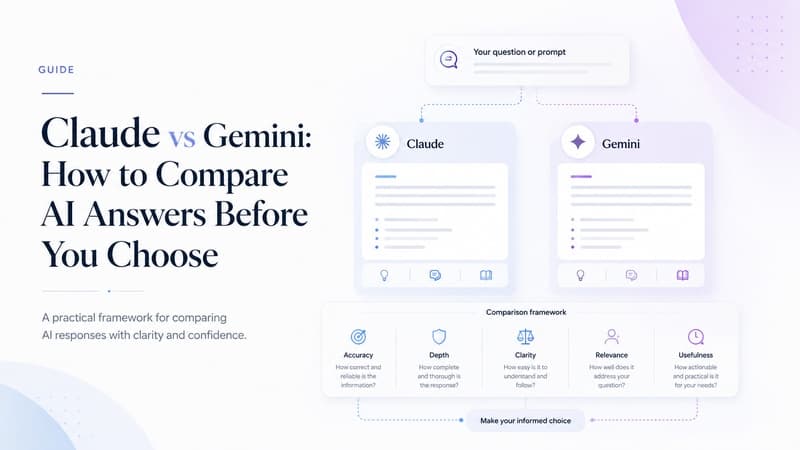
Claude vs Gemini is not a contest with one permanent winner. It is a practical comparison between two capable AI assistants that often feel different because they respond to prompts, context, uncertainty, and structure in different ways. If you write, research, plan, code, summarize, or make decisions with AI, the useful question is not “which model is best?” The useful question is “which model is better for this task, this context, and this level of review?”
Many users discover this only after switching back and forth between tools. One answer may be more concise. Another may be more cautious. One may organize a long brief clearly, while another may produce a stronger first draft for a quick decision memo. Those differences matter because AI output is rarely consumed in isolation. It becomes part of a document, customer reply, product decision, research note, code review, or workflow step. A good Claude vs Gemini comparison therefore needs a repeatable test, not a gut feeling from one prompt.
This guide explains how to compare Claude and Gemini without relying on hype, vague rankings, or one-off examples. It focuses on task fit, answer quality, workflow behavior, and review discipline. If you already compare broader model sets, you may also find the Meshub guide to ChatGPT vs Gemini useful as a related model-pair comparison.
Claude vs Gemini: What Are You Really Comparing?
When people search for Claude vs Gemini, they usually want a clear recommendation. The challenge is that “better” depends on the work. You may care about long-form reasoning, summarization, factual caution, creative range, coding help, tone control, document structure, or speed inside a daily workflow. A model that feels excellent for outlining a strategy memo may not be the one you prefer for short factual extraction. A model that produces polished prose may still need tighter verification before the answer becomes customer-facing.
A useful comparison starts by separating model capability from workflow fit. Capability is what the assistant can often do when prompted well. Workflow fit is whether its answer style helps you move faster with less cleanup, less ambiguity, and fewer review cycles. For most knowledge work, workflow fit is the more durable metric because your team needs repeatable output, not occasional impressive demos.
Comparison Table: Claude and Gemini by Practical Use Case
| Evaluation area | Claude may be useful when... | Gemini may be useful when... | How to test fairly |
|---|---|---|---|
| Long-form writing | You need careful structure, nuanced wording, and a draft that can be edited into a polished document. | You need a fast alternate framing, concise sections, or a different angle on the same brief. | Give both models the same audience, format, tone, and source constraints. |
| Research synthesis | You want a careful synthesis that preserves caveats and separates evidence from recommendation. | You want a compact scan of options, themes, and possible next questions. | Ask both to cite uncertainty, list assumptions, and identify missing data. |
| Decision support | You need a balanced memo with risks, tradeoffs, and stakeholder implications. | You need a quick comparison matrix or a concise recommendation draft. | Use the same scoring criteria and force both to explain confidence levels. |
| Prompt iteration | You want deeper critique of why a prompt is underspecified or risky. | You want alternative prompt versions and quick restructuring ideas. | Run the same prompt twice: first for answer, then for prompt critique. |
| Content repurposing | You need tone-sensitive rewrites for longer content or more formal contexts. | You need shorter variants, headline options, or fast summary formats. | Compare how much editing is required before the output is usable. |
The table is intentionally conservative. It does not claim that either model always wins a category. Instead, it shows how users can frame a fair comparison. If you want a wider framework for pair and multi-model testing, read Meshub’s guide on how to compare AI models side by side.
How to Run a Fair Claude vs Gemini Test
1. Choose one narrow search intent or work goal
Do not ask both models to “write about the topic” and then decide which answer feels better. Define the exact job. Examples include drafting a product FAQ, summarizing a research note, comparing vendor options, rewriting a sales email, creating a code review checklist, or producing a one-page decision brief. A narrow task gives you a fairer test because each model receives the same constraints and expected output.
2. Use the same prompt, source context, and output format
Small prompt differences can create large answer differences. If you give one model more context or a clearer format, you are not comparing models; you are comparing prompt quality. Use one prompt, one context block, and one required output structure. Include audience, goal, length, tone, required sections, and what the model should avoid. This also makes your comparison easier to repeat later.
3. Score answers before you edit them
Many users compare AI answers after mentally fixing the gaps. That hides the real cost of using the output. Score each first response before editing. Look at completeness, factual caution, structure, task alignment, clarity, assumptions, and review effort. A model that produces a slightly less elegant answer but exposes uncertainty clearly may be better for high-stakes work than a model that sounds confident too quickly.
4. Run a revision round
First answers matter, but revision behavior also matters. Ask both models to improve their answer based on the same critique. Some models respond better to detailed correction, while others may preserve the original structure too strongly. The revision round shows how well each assistant works with you, not just for you.
Common Mistakes in Claude vs Gemini Comparisons
The first mistake is using only one prompt. A single prompt can show an interesting difference, but it is not enough to guide a workflow decision. Test at least three representative tasks before forming a strong preference.
The second mistake is judging only polish. Polished text can still miss constraints, skip caveats, or invent unsupported details.
The third mistake is comparing answers without a scoring rubric. Without criteria, the comparison becomes subjective and hard to repeat.
The fourth mistake is treating model choice as permanent. Claude and Gemini, like other AI assistants, can change over time. Your workflow should make model testing easy enough that you can revisit assumptions. That is why side-by-side comparison is more useful than a static ranking. It lets you evaluate the current answer in the current context.
How Meshub.ai Helps
Meshub.ai helps users compare AI answers in one place instead of copying prompts across separate tools and losing track of context. For a Claude vs Gemini workflow, that means you can send the same prompt to multiple models, inspect the answers side by side, and decide which response deserves more trust, more editing, or a second model check.
This is especially useful when your work depends on consistency. A researcher can compare synthesis quality. A writer can compare tone and structure. A product manager can compare risk analysis. A founder can compare strategy recommendations. Meshub does not remove human judgment; it makes the judgment process more visible. Instead of asking one model and hoping it is enough, you can compare, challenge, and refine.
If you are building a broader evaluation habit, the article on testing prompts across AI models gives a practical workflow for prompt consistency, scoring, and revision.
When Should You Prefer One Model?
You may prefer Claude when you need a careful long-form draft, a nuanced critique, or a structured explanation that preserves ambiguity. You may prefer Gemini when you want a compact alternate answer, a quick comparison format, or a different route into the same topic. These are not permanent rules. They are starting hypotheses that should be tested against your own work.
A strong model comparison habit also helps you avoid false certainty. If both models agree and explain their reasoning clearly, your confidence may increase. If they disagree, the disagreement becomes useful. It shows where the task needs better context, better source material, or human review. In many workflows, the disagreement is the point of comparing models.
FAQ
Is Claude better than Gemini?
Not universally. Claude may work better for some long-form, nuanced, or critique-heavy tasks, while Gemini may be useful for other formats and fast alternate perspectives. The best choice depends on your prompt, context, and review criteria.
What is the fairest way to compare Claude vs Gemini?
Use the same prompt, same source context, same required format, and the same scoring rubric. Compare first answers, then run a revision round with identical feedback.
Should I use both Claude and Gemini together?
Using both can be helpful when the work matters enough to justify review. Comparing answers can reveal missing assumptions, weak reasoning, or different ways to frame the final response.
Can a Claude vs Gemini comparison improve prompt quality?
Yes. When two models respond differently to the same prompt, the difference often shows where your prompt is vague. You can improve the prompt by clarifying audience, format, evidence requirements, and decision criteria.
Is side-by-side AI comparison useful for everyday work?
It is useful when you need reliability, not just speed. Side-by-side comparison helps you choose the better answer, combine useful parts, and spot claims that need verification before use.
Use Meshub.ai to compare model answers, test prompts, and build a more reliable multi-model AI workflow from one workspace.