Published June 15, 2026 in Meshub.ai
ChatGPT vs Gemini: How to Compare Answers Before You Choose

Share


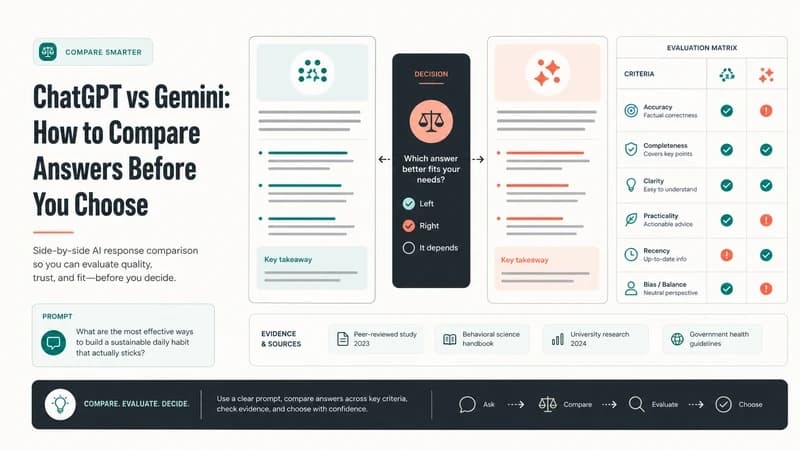
Choosing between ChatGPT vs Gemini is rarely a simple question of which model is better. For most knowledge work, the better question is which assistant gives the most useful answer for this task, this audience, and this level of risk. A model that feels fast in a brainstorming session may be less helpful when you need a careful summary, a structured plan, or a second opinion on an uncertain answer.
This comparison gives you a practical way to evaluate ChatGPT and Gemini without relying on vague impressions. It focuses on search intent, prompt testing, answer review, and repeatable criteria. If your team already compares AI tools as usage grows, pair this guide with What to Compare When AI Usage Scales for a broader evaluation framework.
ChatGPT vs Gemini: The Real Comparison Is Task Fit
ChatGPT and Gemini are both general-purpose AI assistants, but users often bring them into different workflows. One user may prefer a model for drafting, another for research synthesis, and another for turning rough notes into a plan. Because capabilities, interfaces, and connected features can change over time, the safest comparison method is not a fixed ranking. It is a repeatable test that asks both models to solve the same task under the same conditions.
That means your comparison should begin with a narrow use case. Are you writing a blog outline, reviewing a customer support macro, summarizing a long source, planning a product launch, or checking whether an answer is reliable? A clear use case makes the output easier to judge and reduces the temptation to call one model better based on a single impressive response.
Use the same prompt, context, constraints, and scoring rubric when comparing models. Otherwise, you are comparing prompt setups rather than model behavior.
Comparison Table: Where Each Assistant May Fit
| Evaluation area | What to test | How to judge the answer |
|---|---|---|
| Planning | Ask each assistant to turn a messy goal into a step-by-step plan. | Look for sequencing, missing dependencies, realistic scope, and useful tradeoffs. |
| Writing | Give both models the same audience, tone, constraints, and source notes. | Compare clarity, structure, specificity, and how much editing is required. |
| Research synthesis | Provide the same excerpts or notes and ask for a concise synthesis. | Check whether claims are grounded in supplied context and whether uncertainty is preserved. |
| Reasoning | Use a task with constraints, edge cases, or competing priorities. | Evaluate whether the answer explains assumptions and avoids overconfident leaps. |
| Reliability | Ask each model to identify what it is unsure about and what should be verified. | Prefer answers that expose limits, not just polished conclusions. |
| Workflow fit | Run the same task in your real operating environment. | Consider speed, collaboration needs, export paths, and how the answer will be reused. |
How to Run a Fair ChatGPT vs Gemini Test
1. Choose one search intent
Do not test five tasks at once. A fair ChatGPT vs Gemini comparison starts with a single intent such as "draft a technical explainer," "summarize meeting notes," or "evaluate a vendor response." This keeps the answer measurable and prevents the test from becoming a general preference survey.
2. Use a shared prompt package
Create a prompt package with the task, context, audience, output format, success criteria, and constraints. If the prompt includes source material, paste the same source into both assistants. If the task has a preferred format, define that format before either model responds.
3. Score outputs before rewriting
Many users edit the first answer they see, then compare the edited result to an unedited answer from another model. That distorts the test. Score both raw outputs first. Then, if needed, run a second round where each assistant receives the same feedback and revision request.
4. Track disagreements
The most valuable part of a side-by-side AI comparison is often disagreement. When ChatGPT and Gemini frame a problem differently, list the difference. Does one answer include a missing risk? Does the other simplify the structure? Does either model introduce claims that need verification? This is where comparison becomes more useful than single-model prompting.
Common Mistakes in AI Model Comparison
The first mistake is treating tone as quality. A confident answer may still be shallow, incomplete, or wrong. The second mistake is using different prompts because one assistant "seems to need more context." That may be true in your workflow, but it should be tested separately. The third mistake is ignoring downstream effort. A response that looks elegant but takes longer to verify may be less valuable than a plainer response that is easy to check and reuse.
Teams should also avoid making broad claims from one session. AI assistants can vary by task, prompt, context length, and product environment. Run a small set of realistic tasks, score consistently, and update your preference as your work changes. For a deeper explanation of why this habit matters, see Beginner's Guide to Multi-Model AI Platforms.
How Meshub.ai Helps
Meshub.ai helps users discover AI tools and think in workflows rather than isolated apps. For a ChatGPT vs Gemini comparison, that mindset matters because the model choice is only one part of the system. You also need a way to compare answers, keep useful prompts, evaluate alternatives, and decide when a second model should review the first response.
A multi-model workflow can help you turn comparison into a habit: one prompt, multiple answers, a shared scoring checklist, and a final synthesis. If research is your main use case, the internal guide AI Research Workflow: From Questions to Insights gives a practical companion workflow for moving from questions to reviewed conclusions.
When Should You Choose One Model?
Choose one assistant when the task is low risk, familiar, and easy to review. For example, a quick rewrite, a brainstorming list, or a first draft may not need a formal side-by-side comparison every time. The productivity gain comes from knowing when comparison is worth the extra step.
Use both models when the answer will influence a decision, be shared externally, summarize important context, or guide repeated work. In those moments, comparing answers is not about mistrusting AI. It is about reducing blind spots and making the final output easier to defend.
FAQ
Is ChatGPT better than Gemini?
There is no universal answer. The better assistant depends on the task, prompt, context, review process, and user preference. A fair comparison tests both models on the same real workflow.
What is the best way to compare ChatGPT vs Gemini?
Use the same prompt, context, output format, and scoring rubric. Compare raw answers first, then run the same revision request if you need a second round.
Should I use both ChatGPT and Gemini?
Using both can help when the task is important, ambiguous, or hard to verify. For routine low-risk tasks, one assistant may be enough.
What should I score in an AI model comparison?
Score relevance, structure, factual caution, completeness, reasoning, format fit, and the amount of editing or verification required before use.
Can comparing AI answers reduce hallucinations?
It can help reveal inconsistencies and unsupported claims, but it does not replace verification. Treat disagreement as a signal to check sources, assumptions, and missing context.