Published April 30, 2026 in Meshub.ai
How to Build Long Running AI Workflows

Share


Key Takeaways
- The latest workflow signal is not just that AI can do more. It is that AI is being pushed into longer, less predictable tasks.
- As tasks run longer, workflow design matters more than raw model hype.
- Teams need routing, review checkpoints, fallback logic, and multi-model flexibility if they want stable results.
The Most Useful Workflow Signal This Week
The most revealing workflow stories in the current `2026-04-23` to `2026-04-30` window did not come from a single giant product launch. They came from a pattern across several updates.
On `2026-04-24`, DeepLearning.AI highlighted three important ideas in The Batch:
- some coding tasks accelerate far more than others
- at least one major model release was being framed around long-running autonomous work
- data center pushback is growing, which means infrastructure remains a strategic constraint
Then on `2026-04-29`, OpenAI published new writing on both compute infrastructure and cybersecurity. That added two more signals:
- capacity is scaling fast, but compute is still a strategic bottleneck
- deployment visibility and user protection are now central concerns
Put together, these updates tell us something practical. The challenge is no longer only getting access to stronger AI. The challenge is building workflows that can use stronger AI without becoming brittle, expensive, or locked into one path.
Why Long-Running Tasks Change The Design Problem
Short AI tasks are easy to manage. You ask for a summary, draft, outline, or explanation. You review the result. You move on.
Long-running tasks are different. They introduce new failure modes:
- context drifts over time
- tool calls stack up
- assumptions go stale
- costs accumulate quietly
- the model may choose a poor path and stay on it
- the human reviewer arrives too late to correct direction
That is why long-running AI work should never be designed as one long prompt. It should be designed as a workflow.
A workflow has stages, checks, and boundaries. It decides where memory lives, when comparison happens, and who approves what. Without that structure, better models often create more mess, not more leverage.
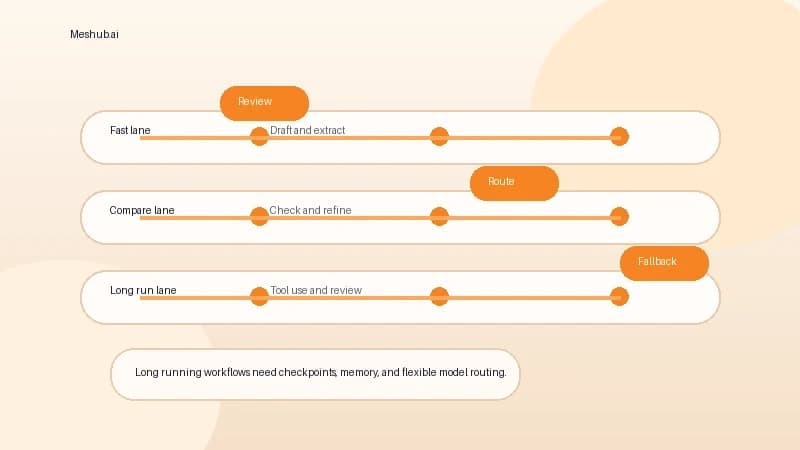
Start By Splitting Work Into Three Lanes
The easiest way to improve AI workflow quality is to stop treating every task the same.
Most teams should split work into three lanes.
Lane 1: Fast And Deterministic
These are tasks where speed matters most and mistakes are easy to catch:
- first drafts
- formatting
- summaries
- extraction
- translation
- spreadsheet cleanup
The workflow goal here is throughput. You want a fast model, a clear prompt template, and lightweight review.
Lane 2: Comparative And Judgment Heavy
These are tasks where the best answer is not obvious until you compare outputs:
- research synthesis
- strategic framing
- positioning drafts
- tool recommendations
- feature tradeoff analysis
This is where multi-model comparison becomes valuable. A single model can still be useful, but teams often get better decisions by comparing several responses in one workspace. That is part of the reason Meshub.ai is useful: it makes side-by-side exploration easier without forcing users to rebuild their process every time they want a second opinion.
Lane 3: Long-Running And Tool-Dependent
These are tasks where work unfolds over time and often needs external tools or structured handoffs:
- coding projects
- multi-step research
- workflow automation
- document review across many files
- recurring operational analysis
This lane needs the strongest controls. Not because the models are weak, but because the task shape is unforgiving.
Add Human Checkpoints Earlier Than You Think
Many teams review too late.
They let the model run for too long, then try to fix direction at the end. That is expensive. It also makes the reviewer do the hardest possible job: understand what happened, find where the drift started, and decide what can still be salvaged.
A better pattern is to add checkpoints at four moments:
1. Before Tool Use
Confirm the objective, the data boundary, and the success condition.
2. After The First Plan
Do not only inspect output. Inspect approach. A weak plan can produce many pages of polished waste.
3. Before Final Synthesis
Ask whether the intermediate evidence still supports the direction. This catches subtle drift.
4. Before Publication Or Execution
Apply the final human judgment where business, legal, or reputational risk lives.
These checkpoints do not slow work down. In long workflows, they usually save time by preventing full-cycle rework.
Build Routing Logic, Not Just Better Prompts
Prompt quality matters, but routing quality matters more over time.
Routing means deciding:
- which model handles which task
- when to switch models
- when a task should pause for review
- when work should be retried with a different setup
This is one reason a multi-model workflow ages better than a single-model workflow. If you only optimize prompts for one provider, your process becomes fragile. If you optimize routing around task shape, your process becomes adaptive.
For example:
- a fast model can handle extraction
- a reasoning model can handle synthesis
- a multimodal model can inspect screenshots or files
- a second model can verify a recommendation before delivery
That logic fits the broader framework in How to Choose the Best AI Model, but long-running workflows push the idea further. It is not only about choosing the best model. It is about choosing the best sequence.
Keep Memory Useful And Small
Long-running workflows fail when memory becomes either too thin or too noisy.
Teams often do one of two bad things:
- they keep almost no structured memory, so the model restarts from scratch
- they keep everything, so context becomes bloated and attention gets diluted
A better memory pattern is selective continuity:
- store goals
- store constraints
- store decisions already made
- store reusable templates
- store key evidence
- discard low-value conversational residue
This is where a unified workspace helps. If conversations, files, and comparison outputs live in one place, it becomes easier to preserve what matters and ignore what does not.
Plan For Reliability, Not Ideal Conditions
The latest infrastructure and security stories matter because they remind us that AI workflows run in the real world.
Compute expands, but demand expands too. Security improves, but risk expands too. A workflow that only works when every model is available, every call is cheap, and every tool behaves perfectly is not a strong workflow.
Design for interruption:
- rate limits
- output variance
- model outages
- missing files
- delayed approvals
- security review requests
A resilient workflow defines fallback behavior in advance. It answers questions like:
- what happens if the preferred model is unavailable
- which step can degrade to a cheaper model
- which outputs always require human review
- when should the system stop instead of guessing
This is one of the clearest lessons from the current AI cycle. Reliability is now part of product strategy.
How Meshub Readers Can Apply This Today
If you want to improve AI workflow quality this week, start with one repeated task and redesign it as a multi-step system.
Use this sequence:
- capture the real task, not the idealized prompt
- split it into fast, comparative, and long-running parts
- assign the right model type to each part
- insert human checkpoints where direction can still change
- compare outputs inside one workspace
- keep the reusable logic and discard the noise
If you need examples of how repeatable AI process design works in practice, AI Content Creation Workflow: Idea to Draft to Publish is a useful model. For the broader context behind why these workflows matter, The Biggest AI Trends in 2026 explains why multi-model usage is becoming normal, not exceptional.
The key shift is this: stop optimizing for the best single answer and start optimizing for the best repeatable system.
Bottom Line
Long-running AI tasks are forcing teams to grow up operationally. Better models and bigger infrastructure help, but they do not remove the need for workflow design.
The teams that win will be the ones that separate task types, compare models intelligently, review earlier, and preserve flexibility. That is how you get more speed without creating more hidden risk.
FAQ
What counts as a long-running AI task?
A long-running task is any task that unfolds across multiple steps, tools, or decision points rather than producing a useful final answer in one short exchange.
Why is multi-model access important for these workflows?
Because different steps often need different strengths. One model may be better for speed, another for reasoning, and another for multimodal inspection or verification.
Where should human review happen?
The best review points are before tool use, after the first plan, before final synthesis, and before publication or execution.
How does Meshub.ai help with this kind of workflow?
Meshub.ai helps users compare models, keep work in one workspace, and reduce the friction of switching approaches when a task needs a different model or review path.
Meshub.ai helps users discover, compare, and explore the best AI tools and multi-model platforms in one place.